Memory cards are everywhere today. You’ll find them in your phone, camera, laptop, gaming console, and even your car’s music system. These tiny devices can store thousands of photos, hours of videos, and countless files. But how do they actually work? And what should you know before buying one?
In this guide, we’ll explain everything about memory cards in simple terms. Whether you’re a beginner or just curious about the technology, this article will help you understand how these amazing little devices work.
What Exactly Is a Memory Card?
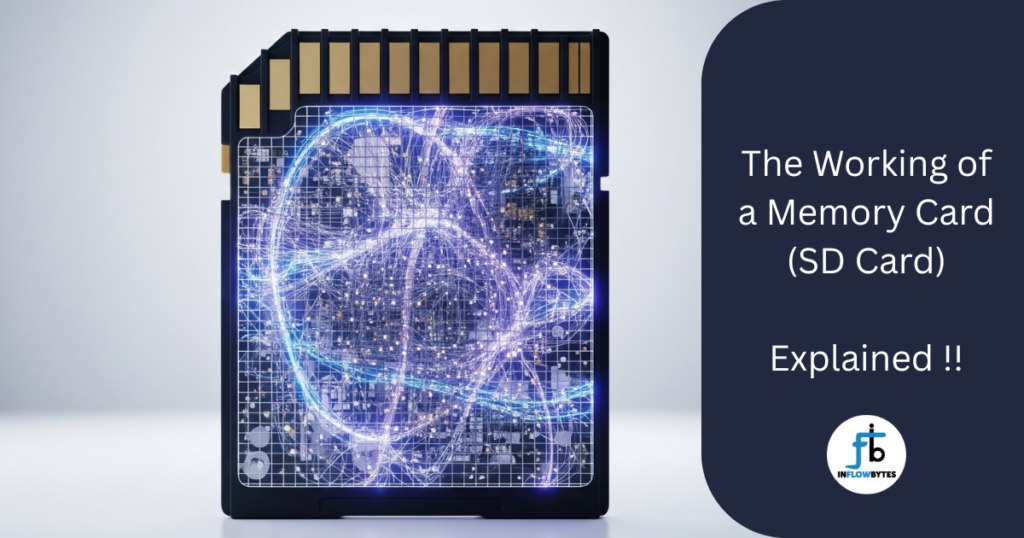
A memory card is a small, portable storage device that can save your digital files. Think of it as a tiny digital filing cabinet that you can carry in your pocket. Unlike your computer’s hard drive, memory cards don’t need constant power to keep your files safe. This means your photos and videos stay saved even when the card isn’t connected to any device.
The most common types you’ll see are:
- SD cards (the regular-sized ones)
- MicroSD cards (the tiny ones for phones)
- CompactFlash cards (bigger ones for professional cameras)
The Science Behind Memory Cards
Flash Memory: The Heart of Every Memory Card
Inside every memory card is something called flash memory. This is different from the memory (RAM) in your computer, which loses everything when you turn off the power. Flash memory is special because it remembers everything even without electricity.
Flash memory works using tiny switches called transistors. These are incredibly small – you could fit millions of them on the tip of a needle. Each transistor can be either “on” or “off,” which represents the 1s and 0s that computers use to store information.
How Data Gets Stored
When you save a photo to your memory card, here’s what happens:
- Your device converts the photo into binary code (lots of 1s and 0s)
- The memory card’s controller decides where to store this data
- Tiny transistors get switched on or off to represent this binary code
- The data gets locked in place using a special electrical process
The amazing part is that once this process is done, the data stays there for years without any power source.
The Controller Chip: The Brain of the Operation
Every memory card has a small computer chip called a controller. This chip is like the manager of a warehouse – it knows where everything is stored and how to find it quickly.
The controller handles several important jobs including deciding where to store new files, finding existing files when you want to open them, making sure the memory card works efficiently, protecting your data from errors, and managing the card’s speed and performance.
Types of Memory Cards Explained
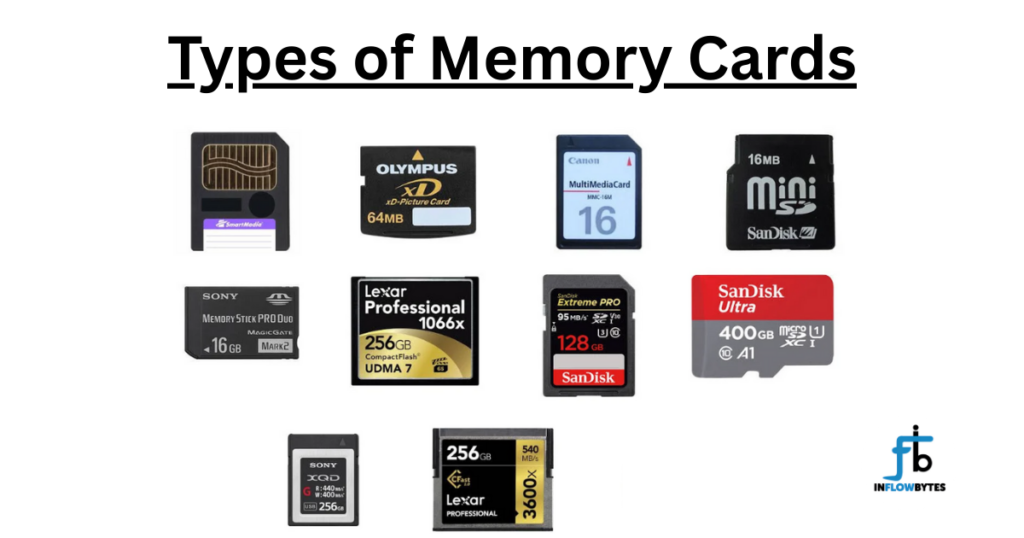
SD Cards (Secure Digital)
These are the most common memory cards. They come in different sizes and capacities:
Standard SD Cards:
- Physical size: 32mm x 24mm
- Good for cameras and laptops
- Easy to handle and less likely to get lost
MicroSD Cards:
- Much smaller: 15mm x 11mm
- Perfect for phones, tablets, and action cameras
- Can be used in SD card slots with an adapter
Mini SD Cards:
- Medium size between SD and microSD
- Less common nowadays
- Mostly found in older devices
CompactFlash Cards
CompactFlash cards are larger and mainly used by professional photographers. They offer faster data transfer, more durability, higher storage capacity, but are more expensive than SD cards.
Other Types
You’ll also find Memory Stick cards mainly used in Sony devices, XD Cards mostly for older digital cameras, and CFexpress cards which are new high-speed cards for professional use.
Storage Capacity: How Much Can They Hold?
Memory cards come in different storage sizes:
Small Capacity (Up to 32GB)
- Good for basic use
- Can store about 8,000 photos or 8 hours of HD video
- Cheaper option for light users
Medium Capacity (64GB to 256GB)
- Perfect for most people
- Can store 16,000 to 64,000 photos
- Good balance of price and storage
Large Capacity (512GB to 1TB+)
- For heavy users and professionals
- Can store over 100,000 photos
- Great for 4K video recording
Speed Classes: Why Speed Matters
Not all memory cards work at the same speed. The speed determines how quickly your files can be saved or opened.
Class Ratings
- Class 4: Minimum 4MB/s – Good for basic photos
- Class 6: Minimum 6MB/s – Better for HD video
- Class 10: Minimum 10MB/s – Great for Full HD video
UHS (Ultra High Speed) Ratings
- UHS-I: Up to 104MB/s – Perfect for 4K video
- UHS-II: Up to 312MB/s – Professional level speed
- UHS-III: Up to 624MB/s – Extreme performance
V-Class (Video Class)
- V30: Good for 4K video
- V60: Professional 4K video
- V90: High-end 8K video recording
How to Choose the Right Memory Card
Consider Your Device
First, check what type of memory card your device accepts. Look for SD card slot, MicroSD card slot, CompactFlash slot, or other specific types.
Think About Your Usage
For Smartphones:
- MicroSD cards
- 64GB to 256GB capacity
- Class 10 or UHS-I speed
For Digital Cameras:
- SD cards or CompactFlash
- 128GB to 512GB capacity
- UHS-II for professional use
For Action Cameras:
- MicroSD cards
- High-speed ratings (V30 or higher)
- Waterproof if possible
For Gaming:
- High-speed cards
- Large capacity for game storage
- Reliable brand for long-term use
File Systems: How Memory Cards Organize Data
Memory cards use different filing systems to organize your data:
FAT32
- Works with most devices
- Maximum file size: 4GB
- Good for basic use
exFAT
- Works with newer devices
- No file size limit
- Better for large files and videos
NTFS
- Mainly for Windows devices
- Very reliable
- Not compatible with all devices
Taking Care of Your Memory Cards
Proper Handling
Keep them clean and dry, store in a protective case, don’t touch the metal contacts, and avoid extreme temperatures.
Safe Usage Tips
Always eject properly before removing, don’t remove during file transfers, format regularly to maintain performance, and keep backup copies of important files.
Common Problems and Solutions
Card Not Recognized:
- Try cleaning the contacts
- Check if the card is compatible
- Test in another device
Slow Performance:
- The card might be full
- Try formatting the card
- Check if you need a faster speed class
Corrupted Files:
- Use data recovery software
- Avoid using damaged cards
- Always safely eject before removing
Advanced Features in Modern Memory Cards
Wear Leveling Technology
Modern memory cards are smart. They use wear leveling to make sure all parts of the memory get used equally. This helps the card last longer.
Error Correction
Memory cards can detect and fix small errors automatically. This keeps your files safe and prevents data loss.
Security Features
Some memory cards come with password protection, encryption for sensitive data, and write protection switches.
The Future of Memory Cards
New Technologies
- 3D NAND: Stacking memory cells to fit more storage
- QLC Technology: Even more storage in the same space
- AI Integration: Smart cards that optimize themselves
Upcoming Standards
- SD Express: Super-fast transfer speeds
- CFexpress 4.0: Professional-grade performance
- Universal Flash Storage: Next-generation mobile storage
Environmental Impact and Recycling
Responsible Usage
Use cards for many years, recycle old cards properly, and choose quality brands that last longer.
Recycling Programs
Many manufacturers offer recycling programs for old memory cards. Check with your local electronics store for options.
Troubleshooting Common Issues
Card Won’t Format
- Try different devices
- Use built-in formatting tools
- Check for physical damage
Files Disappearing
- Check if card is full
- Scan for hidden files
- Use file recovery software
Slow Transfer Speeds
- Check USB port speed
- Use proper card readers
- Ensure card isn’t damaged
Frequently Asked Questions
How long do memory cards last?
Most memory cards can last 10+ years with normal use. High-quality cards from reputable brands tend to last longer.
Can I use the same memory card in different devices?
Yes, as long as the devices support the same card type and file system. You might need to reformat the card for different devices.
What’s the difference between cheap and expensive memory cards?
Expensive cards usually offer better build quality, faster speeds, longer warranty, better reliability, and professional features.
Is it safe to buy memory cards online?
Yes, but buy from reputable sellers. Check reviews and make sure you’re getting genuine products, not counterfeits.
How can I tell if my memory card is fake?
Watch out for unusually low prices, poor packaging quality, slow performance despite high speed ratings, and capacity that doesn’t match what’s advertised.
Can memory cards be repaired if they stop working?
Sometimes yes, but it’s usually not cost-effective. Professional data recovery services can sometimes retrieve files from damaged cards.
Should I format my memory card regularly?
Yes, formatting every few months can help maintain performance and prevent file system errors.
What happens if I remove a memory card while it’s being used?
This can corrupt files or damage the card. Always use the “safely remove” option before taking out your memory card.
Do memory cards work in extreme weather?
Most modern memory cards can handle normal temperature ranges, but extreme heat or cold can cause problems. Check the specifications for your specific card.
Can I password protect my memory card?
Some memory cards come with security features, but you can also use software to encrypt files on any memory card.
Conclusion
Memory cards might be small, but they’re incredibly sophisticated devices. Understanding how they work can help you make better choices when buying them and take better care of the ones you already have.
Whether you’re a casual user who just wants to store some photos or a professional who needs high-speed, high-capacity storage, there’s a memory card that’s perfect for your needs. The key is understanding what features matter most for your specific situation.
As technology continues to advance, memory cards will become even faster, smaller, and more capable. But the basic principles of how they work will remain the same – tiny transistors switching on and off to store your precious digital memories.
Remember to always buy from reputable brands, handle your cards with care, and keep backups of your important files. With proper care, a good memory card can serve you well for many years.